
Manage disk space on a server
On the Business and First Class plans, ServerPilot will track your server’s memory and CPU usage as well as its fullest disk.
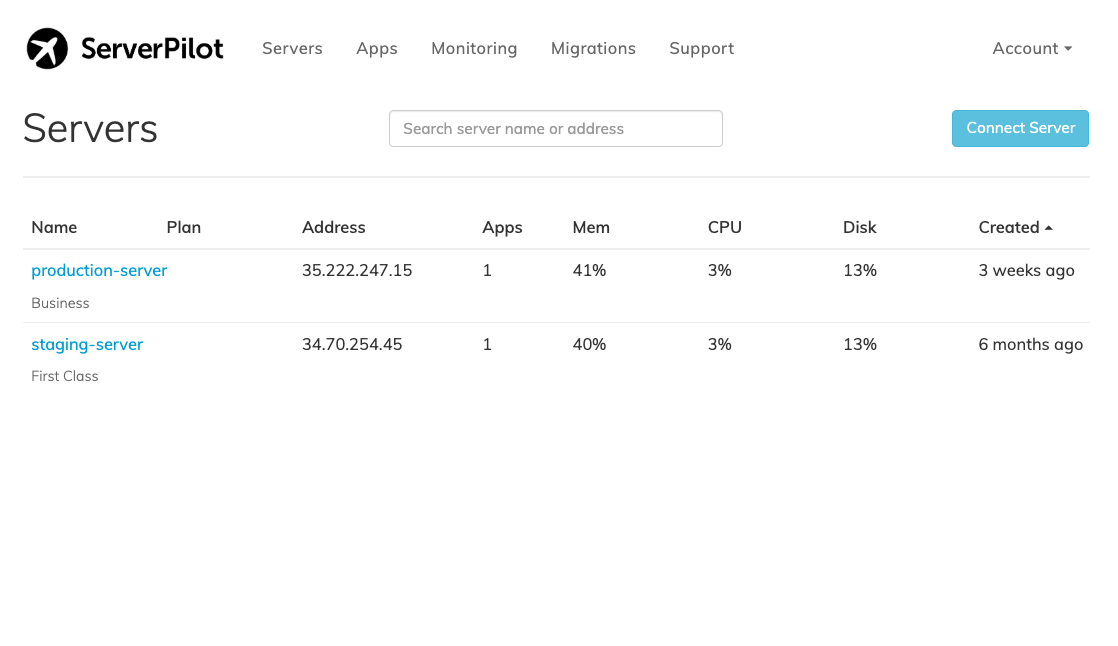
The fullest disk statistic shows you the partition of your server that is the closest to being full.
For example, if you have a 30 GB disk on your server and this disk is divided into two partitions, one of them a 29 GB partition that is 30% full and the other a 1 GB that is 80% full, the fullest disk stat will show the 1 GB partition that is 80% full.
If any partition fills up, it can cause a server to stop functioning, so ServerPilot shows you the partition that is closest to being full.
Fixing a Full Disk
If you notice an unexpected amount of your server’s disk being used,
you can use the du command to find what is taking up space.
The following video shows how to use du to free up disk space on a server.
Find large files
First, SSH in to your server as root and check
the current disk usage with the df command:
df -hCheck the rows under the Use% column for any disks at or near 100%,
particularly the drive with / in the Mounted on column.
When you have found which partition is full, you can use the du command
to find out what is taking up space. The command below displays
the output of du with the items sorted from smallest to largest.
du -sch /* | sort -hKeep running du on the largest directories to drill down
and find where large files are. For example, if the largest directory
in the output of the previous command was /var,
then use the following command next:
du -sch /var/* | sort -hDelete files
When you have found large files that are safe to delete, run the rm command
to remove them. Remember that files cannot be restored after they have been
deleted with the rm command.
If you are unsure which files can safely be deleted, please don’t hesitate to contact our support.
The ncdu command
Instead of using du, you can run the interactive command line tool ncdu
to track down what is consuming the most disk space. To use ncdu,
SSH into your server as root and install the ncdu package:
sudo apt-get install ncduThen you can run ncdu on your full partition and easily navigate
through ncdu using your keyboard’s arrow keys to look
for any files that are using more disk space than you expect.
sudo ncdu /